


 Authorized Dealer
DJI Osmo Action 4 Standard Combo | 1/1.3" Sensor, 4K/120, 18 m Waterproof
Other Configurations

DRONE NERDS RECOMMENDED ACCESSORIES
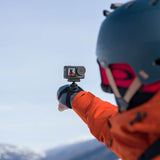
Osmo Action 4 Set the tone. In any light, any weather.
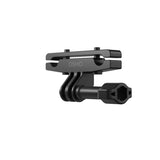
An action camera with best-in-class image quality for its class: a 1/1.3-inch sensor with 2.4 μm pixels, 4K/120 on a 155° ultra-wide view, and 10-bit D-Log M color. It's waterproof to 18 m without a case and records up to 150 minutes even at -20 °C. The Standard Combo has everything you need to start shooting: the camera, an Extreme Battery, the protective frame and a quick-release mount.
Best-in-class
image quality.
A large 1/1.3-inch sensor with 2.4 μm equivalent pixels and an f/2.8 aperture handles high-contrast scenes and low light better than typical action cameras.
-
Sensor1/1.3"2.4 μm equivalent pixels
-
Aperturef/2.8HDR and low light performance
-
Video4K/120155° ultra-wide field of view
-
Color10-bitD-Log M · a billion-plus colors
-
Color
10-bit and D-Log M
Record over a billion colors for flexibility in post, and use D-Log M for a cinematic graded look.
- Bit depth10-bit
- Log profileD-Log M
-
Detail
4K/120 ultra-wide
4K detail and a 120 fps frame rate capture fast action with an impressive sense of depth.
- Max video4K/120
- Field of view155°

Packed with
performance.
Built to go where your phone can't: underwater, into the cold, and through a full day of recording.
-
18 m
Waterproof
Dive to 18 meters with no case.
-
-20 °C
Cold-rated
Up to 150 minutes of recording at -20 °C (-4 °F).
-
Fast
Fast charging
Quick top-ups between runs.
-
×1
Extreme Battery
Included. Add more, or step up to the Adventure Combo for three.
-
Mount
Quick-release mount
Included, with a curved adhesive base.

Level shots.
Instant mounts.
Stabilization that corrects tilt at any angle, and a magnetic quick release that makes switching mounts or orientation a snap.

-
360°
HorizonSteady
Counteracts shake in all directions and corrects horizontal tilt at any angle through bumps and rotations.
-
Mag
Magnetic quick release
Strong impact resistance and a secure connection for fast mount changes.
-
9:16
Native vertical
Switch to vertical shooting with the horizontal-vertical protective frame.
-
Mounts
Extensive accessories
For cycling, hiking, diving, surfing and skiing.

Which Osmo Action?
Standard or Adventure is about the kit. Action 6 is the next-generation camera.
| Spec | Action 4 Standard | Action 4 Adventure → | Action 6 Standard → |
|---|---|---|---|
| Sensor | 1/1.3-inch | 1/1.3-inch | 1/1.1-inch square |
| Aperture | f/2.8 fixed | f/2.8 fixed | f/2.0 to f/4.0 variable |
| Waterproof (no case) | 18 m | 18 m | 20 m |
| Batteries | 1 | 3 + battery case | See listing |
| Extension rod | Not included | 1.5 m | See listing |
Rule of thumb: starting out and shooting a battery at a time? Action 4 Standard. Long days out? The Adventure Combo adds two batteries, a charging case and an extension rod. Want the newest sensor and variable aperture? Action 6.
Key specifications
From DJI's published figures.
- Imaging
- Sensor1/1.3-inch
- Pixel size2.4 μm equivalent
- Aperturef/2.8
- Video4K/120
- Field of view155°
- Color10-bit, D-Log M
- Durability and power
- Waterproof18 m, no case
- Cold recordingUp to 150 min at -20 °C
- ChargingFast charging
- Stabilization360° HorizonSteady
- MountingMagnetic quick release
- Standard Combo
- Batteries1 Extreme Battery
- MountQuick-release adapter mount
- VerticalHorizontal-vertical frame
- SKUCP.OS.00000269.01
In the box
Osmo Action 4 Standard Combo.

- Osmo Action 4×1
- Osmo Action Extreme Battery×1
- Horizontal-Vertical Protective Frame×1
- Quick-Release Adapter Mount×1
- Curved Adhesive Base×1
- Osmo Locking Screw×1
- Type-C to Type-C PD Cable×1
- Osmo Action Lens Hood×1
- Osmo Action Anti-Slip Pad×1
- DJI Logo Sticker×1
- Quick Start Guide, Disclaimer, Warranty Card×1
Questions we get
about Action 4.
Straight answers before you order.
Do I need a dive case to swim with it?
Not for most water use. Osmo Action 4 is waterproof to 18 meters with no case. Go deeper only with a rated dive case.
Does it work in the cold?
Yes. It can record for up to 150 minutes even at -20 °C (-4 °F), which makes it a solid pick for skiing and winter sports.
Can I shoot vertical video?
Yes. Rotate the camera in the horizontal-vertical protective frame for native vertical footage, no cropping.
What does D-Log M do?
D-Log M is a flat color profile that keeps more highlight and shadow detail, so you can grade footage to a cinematic look in editing. Combined with 10-bit color, it holds up to heavy grading.
Action 4 or Action 6?
Action 4 delivers great 4K/120 footage, 18 m waterproofing and strong cold-weather performance. Want more batteries? The Action 4 Adventure Combo adds two plus a charging case. Action 6 adds a larger 1/1.1-inch square sensor, a variable aperture and up to 240 minutes of runtime.
Bought from the people
who use them.
Drone Nerds is an authorized DJI dealer with a DJI Authorized Service Center in South Florida. Real stock, real warranty, real people on the phone.
Authorized DJI dealer
Factory-new US stock, full DJI warranty, ships from the USA.
DJI Authorized Service Center
Repairs and warranty work by certified techs in South Florida.
Free shipping over $49
Fast from Fort Lauderdale to the lower 48.
Real people on the phone
Call 786-708-7807.


What resolution settings does Osmo Action 4 support?
Osmo Action 4 supports the following resolution settings:
4K (4:3): 3840×2880@24/25/30/48/50/60fps
4K (16:9): 3840×2160@100/120fps
4K (16:9): 3840×2160@24/25/30/48/50/60fps
2.7K (4:3): 2688×2016@24/25/30/48/50/60fps
2.7K (16:9): 2688×1512@100/120fps
2.7K (16:9): 2688×1512@24/25/30/48/50/60fps
1080p (16:9): 1920×1080@100/120/200/240fps
1080p (16:9): 1920×1080@24/25/30/48/50/60fps
What video formats does Osmo Action 4 support?
Osmo Action 4 supports MP4 (H.264/HEVC) format.
Does Osmo Action 4 support distortion correction?
Yes. You can switch the FOV to Standard (Dewarp) on the video and audio parameter settings page on the right side of the camera view.
Can I save the original photos from Timelapse?
Yes. Photos from Timelapse can be downloaded and viewed on a computer.
What is RockSteady 3.0?
Osmo Action 4 uses RockSteady 3.0 technology to stabilize footage. This Electronic Image Stabilization (EIS) technology is realized by increasing the shutter speed, analyzing the images captured by the CMOS sensor, and compensating by cutting off the edges of these images. In this way, multiple frames are overlaid and finally combined into a single frame that is sharp, clear, and accurately exposed.
What is HorizonSteady?
HorizonSteady uses DJI's latest stabilization algorithm to correct shakes for any horizontal rotation (360°) and lock onto a leveled horizon in every frame, regardless of how the camera is mounted or worn. It allows you to capture smooth and stable footage whether you are cycling on bumpy roads or go-karting around a track.
What shooting resolutions does HorizonSteady support?
HorizonSteady supports 1080p@24/25/30/48/50/60fps and 2.7K (16:9)@24/25/30/48/50/60fps.
Can Osmo Action 4 shoot slow-motion videos?
Yes. Osmo Action 4 supports up to 1080p/240fps 8x slow-motion videos.
What is D-Log M of Osmo Action 4's color mode?
It is designed to capture a wide dynamic range from the sensor, and colors are distributed evenly so the bright and dark parts of the video have greater fidelity and clarity. It is not a LUT, but a lower-contrast video with a flat color profile, which is great for expanding post-processing options.
How do I export photos and videos from Osmo Action 4?
There are three exporting options available:
1. Connect to the DJI Mimo app and download the content to your smartphone.
2. Insert the microSD card from Osmo Action 4 into a computer.
3. Use a Type-C cable to connect Osmo Action 4 to a computer or certain smartphones with a Type-C port.
Where is the footage saved in Osmo Action 4?
The footage is saved to the microSD card inserted into Osmo Action 4.
Does Osmo Action 4's camera use a prime lens?
Yes. Osmo Action 4 uses a prime lens, and subjects are clear when they are at least 400 mm or more from the lens.
Can I set metering for Osmo Action 4?
Osmo Action 4 supports evaluative metering but not spot metering.
Can I shoot HDR videos with Osmo Action 4?
Videos recorded by Osmo Action 4 have a high dynamic range making an HDR mode unnecessary.
Where is the color temperature sensor of Osmo Action 4? What is it for?
The color temperature sensor of Osmo Action 4 is built into the letter "O" of the logo on the front of the camera. Do not cover it during use. With the color temperature sensor, Osmo Action 4 delivers outstanding color temperature performance even in scenarios with complex lighting, such as diving. The sensor corrects color temperature when filming underwater and reduces color temperature flicker due to the change of shooting angle. It can also detect and reduce light flickering more accurately.
What video and stabilization specifications does auto low-light image enhancement support?
When Low-Light Image Enhancement is set to Auto, it supports all stabilization options for 1080p@24/25/30fps, 2.7K (16:9 or 4:3) @24/25/30fps, and RockSteady for 4K (16:9) @24/25/30fps.
What app do I use to control Osmo Action 4 with my smartphone?
Users can control Osmo Action 4 via smartphone with the DJI Mimo app. It allows you to adjust settings and shooting modes, sync photos and videos, and to edit and share images and footage.
How do I activate Osmo Action 4?
You can follow the steps below to activate the device:
1. Download the DJI Mimo app by scanning the QR code shown on the camera screen prompt or from an app store.
2. Press and hold the Quick Switch button to power on Osmo Action 4.
3. Launch the DJI Mimo app, tap the camera icon on the upper left corner of the home screen, enable Bluetooth and Wi-Fi on your smartphone, and connect to Osmo Action 4.
4. After connecting Osmo Action 4 to the DJI Mimo app, you will be prompted to activate the device.
5. Complete the activation by following the prompts in the app.
How do I update the firmware of Osmo Action 4?
The DJI Mimo app will send firmware push messages automatically. Follow the prompts to complete the update.
How do I switch between the front and back screens?
Swipe up from the bottom of a screen to unlock it and switch to that screen. Through the camera menu, users can opt to display the front and rear screens simultaneously or to use just one screen.
Does the front screen support touch control?
Yes. You can control parameter settings, mode switching, video playback, and more.
How do I switch to vertical shooting?
Mount the camera with the Horizontal-Vertical Protective Frame, and hold the camera in a vertical orientation or use it with accessories to switch between horizontal and native vertical shooting.
Does Osmo Action 4 support voice control?
Yes. Osmo Action 4 supports voice commands in English and Mandarin Chinese. It's recommended to use voice control within one meter from the camera in a relatively quiet environment.
English commands:
Start Recording
Stop Recording
Take Photo
Shut Down
How do I use the InvisiStick feature?
After shooting a video with Osmo Action 4 and the selfie stick, you can connect it to the DJI Mimo app to eliminate the selfie stick*. For details, refer to the tutorial video.
* To ensure the elimination effect works adequately, use the Osmo 1.5m Extension Rod when shooting and try to avoid covering any of your body with it. InvisiStick supports up to 1920×1440 video when eliminating on the cloud, and up to 1280×960 video when eliminating locally.
How do I share a video that I shot?
You can save the video to your smartphone and share it, or use the DJI Mimo app to upload it and share the link generated.
How do I set the shutter speed, ISO, and other camera parameters manually?
1. On the right side of the camera view, tap the icon for adjusting image and audio parameters, enable PRO mode in the upper right corner, then select M mode to adjust shutter speed, ISO, and other camera parameters manually.
2. Launch the DJI Mimo app, enable PRO mode on the upper left corner of the main page, then tap Settings on the top to adjust shutter speed, ISO, and other camera parameters manually.
Does Osmo Action 4 have sleep mode?
Yes. When Osmo Action 4 is powered on, press and hold the Quick Switch button to enter sleep mode. Press the button once to wake the screen. Press the shutter/record button once to enable SnapShot.
Can I use an external microphone with Osmo Action 4?
Yes. You can connect Osmo Action 4 with a third-party microphone via a universal 3.5mm Type-C cable.
Can I set the playback volume of Osmo Action 4?
Yes. Tap the volume icon in the upper right corner of the playback page to turn the sound on or off. Press and hold the icon to adjust the volume.
What are the functions of the Snapshot button on Osmo Action?
When the camera is powered off, short-press the SnapShot shutter/record button on the top to start recording. Press again to finish recording, and Osmo Action 4 will power off automatically after three seconds. This lets you start shooting right away, so you never miss a memorable moment.
How long is the operating time of Osmo Action 4?
The max operating time of Osmo Action 4 is 160 minutes*, and up to 150 minutes when shooting in environments with temperatures as low as -20° C (-4° F)**.
* In a 25° C (77° F) laboratory environment and at 1080p/24fps (16:9), with RockSteady on, Wi-Fi off, and screen off. This data is for reference only.
** In -20° C (-4° F) laboratory environment and at 1080p/24fps (16:9), with RockSteady on, Wi-Fi off, and screen off. This data is for reference only.
Does Osmo Action 4 support fast charging?
Yes. You can use the DJI 30W USB-C Charger* to fast charge Osmo Action 4.
* The DJI 30W USB-C Charger is sold separately.
Can Osmo Action 4 be charged while in use?
Yes. When the battery is not inserted, you can still use the camera by connecting it to the power supply using a Type-C data cable.
What accessories does Osmo Action 4 have?
DJI has designed a range of accessories to use Osmo Action 4 within various scenarios. Check the Accessories section on the product page for more details.
Can I use Osmo Action 4's accessories with other Osmo Action series products?
Please check the accessory compatibility page for more details.
How do I mount different accessories to Osmo Action 4?
1. Official accessories can be attached directly to Osmo Action 4.
2. For non-official accessories, check the accessory's manual for installation instructions.
What should I do if the preview image is lagging while shooting in cold environments?
1. Warm up the camera before use.
2. Reduce the resolution or frame rate.
3. Ensure the microSD card is at least UHS-I Speed Grade 3.
What should I do if the camera crashes during firmware update?
1. Restart Osmo Action 4 and the DJI Mimo app.
2. Remove and reinsert the microSD card.
3. Retry the firmware update. If the issue persists, contact DJI Support.
What should I do if the camera becomes hot while charging and using Osmo Action 4 for an extended period?
This is normal. The camera will regulate its temperature automatically.
What should I do if there is dust inside the camera lens?
Do not disassemble the camera yourself. Contact DJI Support for assistance.
- Osmo Action 4×1
- Osmo Action Extreme Battery×1
- Horizontal-Vertical Protective Frame×1
- Quick-Release Adapter Mount×1
- Curved Adhesive Base×1
- Osmo Locking Screw×1
- Type-C to Type-C PD Cable×1
- Osmo Action Lens Hood×1
- Osmo Action Anti-Slip Pad×1
- DJI Logo Sticker×1
- Quick Start Guide, Disclaimer, Warranty Card×1
