What is the minimum object distance supported by Osmo Pocket 3? The minimum object distance is 20 cm.
What Timelapse modes are available on Osmo Pocket 3? What parameters can be customized?
There are three modes: Hyperlapse, Timelapse, and Motionlapse.
In Hyperlapse mode, you can set the resolution, frame rate, and speed.
In Timelapse mode, you can set the resolution, frame rate, interval, and duration.
In Motionlapse mode, you can set the resolution, frame rate, interval, duration, and waypoints.
Can I save individual images from the timelapse when shooting a timelapse video on Osmo Pocket 3? Only videos are saved by default. Adapt settings in Pro mode to save images.
In Pro mode, you can set the format to Video + JPEG or Video + RAW to save both the original images and the final timelapse video.
What is Osmo Pocket 3's color mode D-Log M? D-Log M is designed to capture a wide dynamic range from the sensor, and colors are distributed evenly so the bright and dark parts of the video have greater fidelity and clarity. It is not a LUT but a lower-contrast video with a flat color profile, which is great for expanding post-processing options.
Where is the footage saved in Osmo Pocket 3? The footage is saved to the microSD card inserted into the device.
What focus modes are available on Osmo Pocket 3? Single, Continuous, and Product Showcase mode.
What are the main differences between DJI Pocket 2 and Osmo Pocket 3?
1. Osmo Pocket 3's sensor has been upgraded from 1/1.7 inches to 1 inch to deliver high-definition footage in various scenarios, low-noise night shots, high-dynamic range capabilities in high-contrast scenarios, and support for 4K/120fps.
2. The upgraded 2-inch OLED screen delivers richer colors and higher contrast. The image size is larger, presenting clearer details, and both horizontal and vertical shots can be displayed on full screen. Simply double-tap your subject on the screen to start tracking or rotate the screen to quickly power on or off the device.
3. Pocket 2 requires the Do-It-All Handle for Wi-Fi connection to a smartphone, while Pocket 3 features built-in Wi-Fi for direct connection to a smartphone.
4. Intelligent Feature upgrades:
a. ActiveTrack has been upgraded to 6.0, achieving a perfect combination of mechanical gimbal and intelligent tracking algorithms. No matter how you hold the device or move the camera, the tracked subject stays centered.
b. Face Auto-Detect mode:
Record single-person vlogs with ease. After the subject enters the frame, the camera will automatically recognize and smoothly track them in center frame.
c. Dynamic Framing mode:
Improve creative efficiency and reduce stress by locking the subject in the center frame or a set position.
How do I turn Osmo Pocket 3's ActiveTrack function on and off?
1. Double-tap your subject on the screen to turn on ActiveTrack. Tap outside the tracking frame or press the joystick once to turn off ActiveTrack.
2. In the DJI Mimo app, frame to select the subject and turn on ActiveTrack. Tap “×” in the upper right corner of the tracking frame to stop tracking.
3. ActiveTrack is not supported in Low-Light, Panorama, Slow Motion, and Timelapse modes.
How do I switch between horizontal and vertical shooting on Osmo Pocket 3?
By default, the horizontal or vertical shooting mode will automatically switch according to the screen orientation. To adjust this, you can access the settings interface and select Landscape, Portrait, or Auto-Rotation.
When the recording starts, the horizontal or vertical shooting mode is locked, and switching is not available.
What shooting parameters can be set in Pro mode on Osmo Pocket 3?
Photo: Exposure, WB, Format, Focus Mode.
Video: Exposure, WB, Glamour Effects, Color, Focus Mode, Channel, Wind Noise Reduction, Directional Audio.
Low-Light: Exposure, WB, Glamour Effects, Focus Mode, Channel, Wind Noise Reduction, Directional Audio.
Slow Motion: Exposure, WB, Focus Mode, Channel, Wind Noise Reduction, Directional Audio.
Timelapse: Exposure, WB, Format, Focus Mode.
What video formats does Osmo Pocket 3 support? MP4 (H.264/HEVC).
What is Osmo Pocket 3's operating time? 166 minutes.
Tested at room temperature (25° C/77° F) and 1080p/24fps (16:9), with Wi-Fi off and screen off. This data is for reference only.
Does Osmo Pocket 3 support fast charging? Yes, it can be charged to 80% in 16 minutes and 100% in 32 minutes.
Tested in a laboratory environment with the DJI 65W PD charger (sold separately).
Can I use Osmo Pocket 3 to charge my phone? No.
Can I use Osmo Pocket 3 while charging? Yes, but we recommend using it after it is fully charged. Osmo Pocket 3 draws power directly from the power input while recording and only charges the battery when recording has stopped.
What app can I use to control Osmo Pocket 3 with my smartphone? The DJI Mimo app. It allows you to sync photos and videos, edit, and share.
How do I activate Osmo Pocket 3?
You can follow the steps below to activate the device:
1. Download the DJI Mimo app by scanning the QR code shown on the camera screen prompt or from an app store.
2. Press and hold the shutter/record button to power on Osmo Pocket 3.
3. Launch the DJI Mimo app, tap the camera icon on the upper left corner of the home screen, enable Bluetooth and Wi-Fi on your smartphone, and connect to Osmo Pocket 3.
4. After connecting Osmo Pocket 3 to the DJI Mimo app, you will be prompted to activate the device.
5. Complete the activation by following the prompts in the app.
How do I adjust the stabilization level on Osmo Pocket 3? In the camera view, swipe down to enter the control center, and then tap the walking person icon to adjust the Rotational Speed.
How do I control the gimbal rotation direction of Osmo Pocket 3?
You can control the gimbal rotation direction in the following ways:
1. Via Osmo Pocket 3: When the slider in the home screen displays the zoom ratio, move the joystick to control the tilt and pan axes. When the slider in the home screen displays only the arrow patterns without numbers, drag the slider up or down to control the tilt axis, and move the joystick left or right to control the pan axis.
2. Via DJI Mimo: Access the camera view in the app, and then use the virtual joystick to control the tilt and pan axes.
How do I connect Osmo Pocket 3 to my phone?
1. Turn on Wi-Fi and Bluetooth to connect Osmo Pocket 3 to the DJI Mimo app for device control, firmware updates, and material export.
2. Select OTG connection in system settings on Osmo Pocket 3 and connect it to an OTG-supported smartphone through a USB-C to USB-C cable for file export.
How do I connect Osmo Pocket 3 to my computer? Connect Osmo Pocket 3 to a computer through a USB-C cable for file transfer or to use as a webcam.
How do I export photos and videos from Osmo Pocket 3?
1. Connect to the DJI Mimo app and download the content to your smartphone.
2. Insert the microSD card from Osmo Pocket 3 into a computer.
3. Connect to a computer or an OTG-supported smartphone through a USB-C cable.
At what point does Osmo Pocket 3 split a recording into different videos? Osmo Pocket 3 will automatically split the recording without damaging quality when it approaches 16 GB.
Are Glamour Effects available both in photo and video modes?
Glamour Effects is available in video mode but not in photo mode. Glamour Effects can be used in video mode, whether using Osmo Pocket 3 independently or with a smartphone.
When shooting with Osmo Pocket 3 independently, you can obtain the glamour effects after exporting the footage through the DJI Mimo app, where you can further adjust various Glamour Effects parameters.
Glamour Effects supports adjusting up to 4K/60fps videos. However, depending on their processing performance, some smartphone models only support exporting 1080p/30fps videos.
Can Osmo Pocket 3 shoot slow-motion videos? Yes, it supports shooting up to 1080p/240fps 8x slow-motion and 4K/120fps 4x slow-motion videos.
How do I export panoramas shot on Osmo Pocket 3? Osmo Pocket 3 supports in-device panorama stitching. You can connect to the DJI Mimo app and access the playback interface to download the images to your smartphone or export them to your computer through the microSD card.
Does Osmo Pocket 3 support volume gain control?
Osmo Pocket 3's internal audio recording will automatically adjust the volume gain based on the zoom ratio but does not support customizable adjustments.
When Osmo Pocket 3 is connected to a third-party external audio recording device, volume gain can be customized.
Does Osmo Pocket 3 support livestreaming? What platforms does it support?
Yes.
It supports RTMP platforms.
Does Osmo Pocket 3 support screen-off recording? Yes. Swipe down on the screen to access the menu, go to system settings, and then select the time for Scrn Off When Rec. This can be set to 3 s, 15 s, 30 s, 1 min, 5 mins, 10 mins, or never.
How do I use Audio Zoom with Osmo Pocket 3? Audio Zoom is enabled by default on Osmo Pocket 3 and will be activated with changes in the zoom ratio.
Can I use the USB-C port of Osmo Pocket 3 to export real-time footage with an HDMI cable? No.
Is Osmo Pocket 3’s 1-inch sensor the same as DJI Air 2S? No. Osmo Pocket 3 features an all-new 1-inch stacked CMOS sensor, which supports up to 4K/120fps uncropped recording (available only in Slow Motion mode) and full-pixel PDAF, delivering enhanced overall performance.
Where are the microphones on Osmo Pocket 3? Do they support directional audio?
Osmo Pocket 3 has three microphones, one on each non-screen sides.
When Pro mode is off, the Directional Audio is set to All by default. When Pro mode is on, you can switch between Front, Front and Back, and All.
How much operating time can the Battery Handle add to Osmo Pocket 3?
When fully charged and connected to Osmo Pocket 3, the Battery Handle can increase the operating time by approximately 62% (an additional 103-min operating time at 1080p/24fps).
Data tested under laboratory conditions at 25° C (77° F) and can be used for reference only.
Can I use the Osmo Pocket 3 Battery Handle to charge my phone? No.
How do I connect Osmo Pocket 3 to DJI Mic 2?
Swipe down on the screen to access the menu, go to system settings, select the wireless microphone, and then enter linking mode.
Follow the on-screen instructions to put DJI Mic 2 into linking mode. After successful linking, return to the home screen, and a volume bar will be displayed at the top.
After the first linking, the device will automatically connect when powered on.
Does Osmo Pocket 3 support connection to two DJI Mic 2 transmitters? Yes.
Does Osmo Pocket 3 support connection to DJI Mic? Osmo Pocket 3 does not support a direct connection to DJI Mic. It needs to be used with the DJI Mic Receiver plugged in.
Are Osmo Pocket 3 accessories compatible with Pocket 2? No.
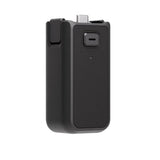
What are the functions of the Osmo Pocket 3 Handle With 1/4″ Thread?
1. It provides a connection hole for a tripod with 1/4″ thread.
2. It transforms the USB-C port to the rear for easy recording while charging when placed somewhere.
3. It extends the handle length to enhance the holding experience.
How do I attach and detach the Handle With 1/4″ Thread or Battery Handle?
For attachment, you don’t need to press the front release button. Align with the USB-C port, insert, and ensure secure buckles on both sides.
For detachment, press the front release button and pull out.
What accessories can be stored in the Osmo Pocket 3 Protective Cover?
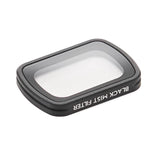
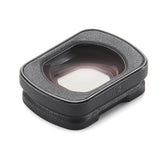
The Osmo Pocket 3 Protective Cover can store the Osmo Pocket 3 Wide-Angle Lens and Osmo Pocket 3 Black Mist Filter, while the DJI Mic 2 Transmitter can be attached to the top.
Do I need to use Osmo Pocket 3 with the Protective Cover or Carrying Bag every time?
The new Osmo Pocket 3 features an axis lock design, making it suitable for loose pockets or small bags during daily use. Avoid pressure from hard objects when storing. Use it with the Protective Cover when stored in a large bag like a backpack or canvas bag.
How do I mount the Osmo Pocket 3 Expansion Adapter?
Open the Osmo Pocket 3 Expansion Adapter, align it with the curved edge of the joystick base, and slowly insert the joystick into it. Ensure the proper installation position while also allowing screen rotation before fastening the adapter buckle.
What accessories does Osmo Pocket 3 support?
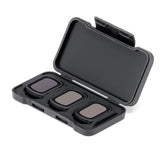
Osmo Pocket 3 supports the following accessories: Handle With 1/4″ Thread, Battery Handle, DJI Mic 2 Transmitter, Wide-Angle Lens, Mini Tripod, Black Mist Filter, Expansion Adapter, Magnetic ND Filters Set, Carrying Bag, Protective Cover, and Type-C to Type-C PD Cable.
How do I update the firmware on Osmo Pocket 3? The DJI Mimo app will send firmware push messages automatically. Follow the prompts to complete the update.
How do I manually set the shutter speed, ISO, and other camera parameters?
1. Swipe left on the Osmo Pocket 3 screen, tap the PRO icon in the upper right corner to enable Pro mode, and then select Exposure - M (Manual mode) to adjust the shutter and ISO parameters.
2. Launch the DJI Mimo app, tap AUTO in the upper right corner of the camera view, and then tap M to adjust the shutter and ISO parameters.
Can I use an external microphone with Osmo Pocket 3?
Yes. You can connect Osmo Pocket 3 with a third-party microphone through USB-C digital signals or a 3.5mm port adapter.
Can I set the playback volume of Osmo Pocket 3?
Yes. In the playback interface, tap the speaker icon in the upper right corner and drag the volume slider to adjust the video playback volume.
Can I change the lens on Osmo Pocket 3?
No.
Can Osmo Pocket 3 be connected to Bluetooth or Wi-Fi?
Yes.
Is Osmo Pocket 3 waterproof?
No.
What is LightCut?
LightCut is a video editing application recommended by DJI. It provides intuitive shooting and editing functions for DJI users, including AI-based One-Tap Edit, diverse exclusive video templates, inspirational creative tutorials, and many other resources that let you edit and generate videos effortlessly wherever you go. Click here to learn more: https://www.dji.com/lightcut.
How do I download LightCut?
You can download the LightCut app from major app stores or from the Download Center on the official DJI website. Click to download: https://www.dji.com/downloads/djiapp/lightcut.
How do I connect LightCut with Osmo Pocket 3?
1. Make sure your Osmo Pocket 3 is activated and powered on, and then enable Bluetooth and Wi-Fi on your smartphone.
2. Launch LightCut, and then tap the device icon on the top.
3. Select your device ID and tap Connect. Check the device verification code and tap Accept. After a prompt asking you to join the Wi-Fi network pops up, tap to join.*
During the connecting process, do not exit the app. During use, make sure Osmo Pocket 3 is powered on, enable Bluetooth and Wi-Fi on your smartphone, and Osmo Pocket 3 will automatically connect to LightCut.
What features are supported when Osmo Pocket 3 is connected to LightCut?
1. The LightCut app provides numerous templates that fit different scenarios captured on the Osmo Pocket series. After connection, you can easily preview the footage without outputting it, allowing you to edit easily and generate videos efficiently.
2. One-Tap Edit will automatically recommend templates according to your selected clips and intelligently select clips to generate a short video with no manual editing required.
3. You can customize the editing, music, text, stickers, speed, filter, and more in the app for more flexibility and creative freedom.
What should I do if a timeout prompt appears during the connection process?
Place your smartphone closer to Osmo Pocket 3 and try again.
How do I forget a device that has been connected to my smartphone?
iOS: Launch LightCut, and then view connected devices in My Device. Swipe left across the device and then remove the device.
Android: Launch LightCut, and then view connected devices in My Device. Press and hold the device and then remove it.
What should I do if the device cannot be found?
Make sure Bluetooth and Wi-Fi are enabled on your smartphone and the device is powered on and activated. Place your smartphone closer to the device and try again.
Can I connect to Wi-Fi after removing the device in My Device?
Yes. After removing the device, follow the instructions in the app to complete the connecting process.
How do I access the Pro mode when using Osmo Pocket 3 with the LightCut app?
Currently, Pro mode is not supported in the LightCut app.
Can I capture and generate videos offline after removing the device?
Yes. After the device is removed, you can use the app to generate and edit videos offline.
What features are available in LightCut when Osmo Pocket 3 is not connected?
When Osmo Pocket 3 is not connected, you can use the LightCut app to generate and edit videos, select templates, and manage your materials, but you will not be able to preview clips before output or take advantage of One-Tap Edit.


 Authorized Dealer